
Authentication
Before you start, please generate an API key by visiting the API key page.
We use the HTTP Bearer token as our authentication method. For all endpoints, include this header:
Authorization: Bearer YOUR_TRIPO_API_KEY
Once you've generated an API key, store it somewhere in a secure location.
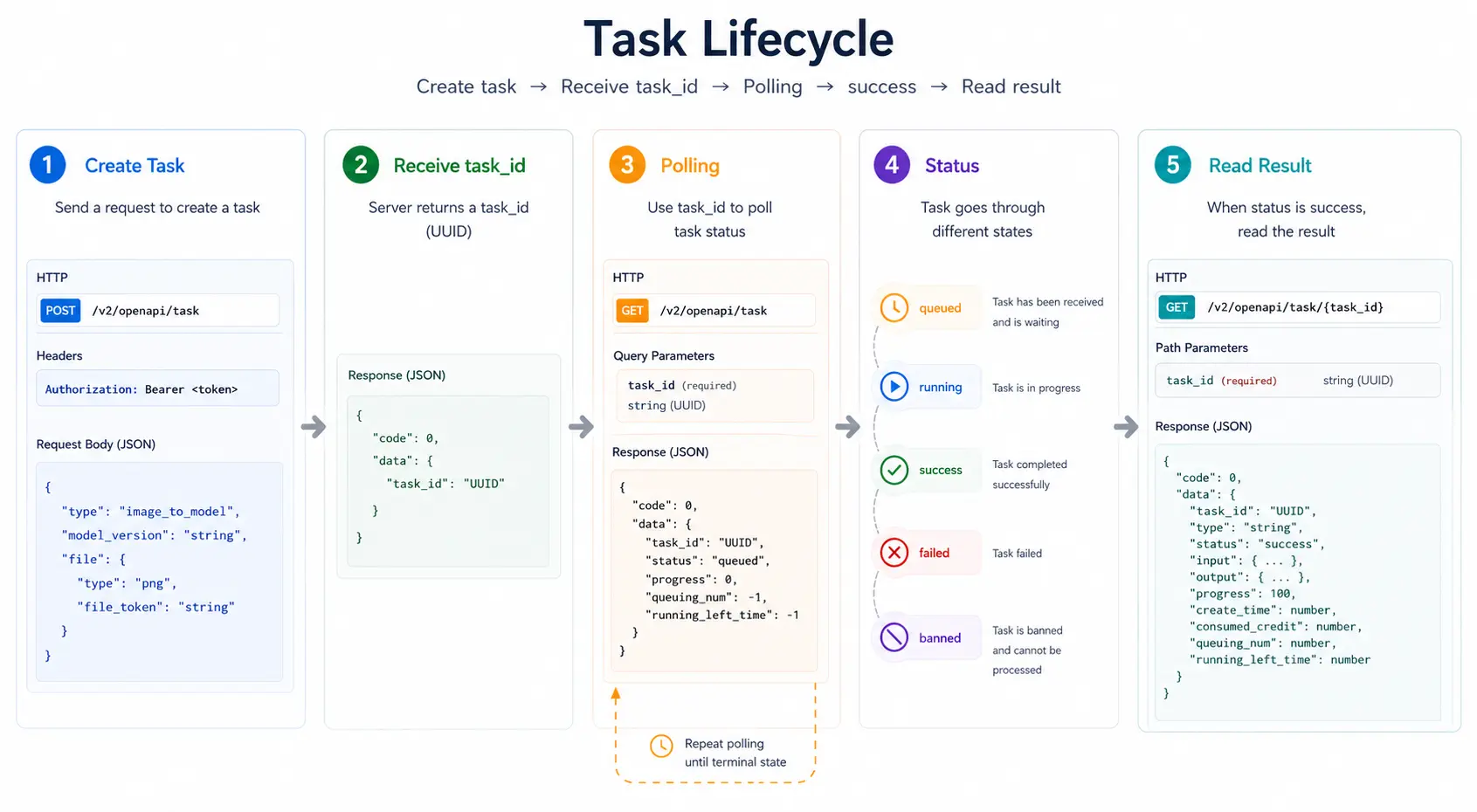
Fastest path (30 seconds)
- Submit a task with
POST /v2/openapi/task. - Get
task_idfrom the response. - Poll
GET /v2/openapi/task/{task_id}untilstatusbecomessuccess. - Read outputs from
data.output.
Task lifecycle
Try the first task with your key
Once you’ve generated your API key, you can try to trigger your first 3D model generation request:
python
import requests
import json

url = "https://api.tripo3d.ai/v2/openapi/task"

payload = json.dumps({
  "type": "text_to_model",
  "prompt": "A dachshund standing on a stool.",
})
headers = {
  "Content-Type": "application/json",
  "Authorization": "Bearer YOUR_TRIPO_API_KEY",
}

response = requests.request("POST", url, headers=headers, data=payload)

print(response.json()["data"]["task_id"])
Or try our fantastic image generation request for flux.1 kontext pro:
python
import requests
import json

url = "https://api.tripo3d.ai/v2/openapi/task"

payload = json.dumps({
  "type": "generate_image",
  "prompt": "A dachshund standing on a stool.",
})
headers = {
  "Content-Type": "application/json",
  "Authorization": "Bearer YOUR_TRIPO_API_KEY",
}

response = requests.request("POST", url, headers=headers, data=payload)

print(response.json()["data"]["task_id"])
Then you can query the final result with your_task_id:
python
import requests
import time

url = "https://api.tripo3d.ai/v2/openapi/task/07764597-9c93-4eb9-92b6-4ea96a8c7d1a"

headers = {
    "Content-Type": "application/json",
    "Authorization": "Bearer YOUR_TRIPO_API_KEY",
}

poll_interval_seconds = 2

while True:
    response = requests.get(url, headers=headers)
    data = response.json().get("data", {})
    status = data.get("status")

    if status == "success":
        print(data.get("output"))
        break

    print(f"Current status: {status}")
    time.sleep(poll_interval_seconds)
Using Python SDK
We also provide an official Python SDK to simplify integration with the Tripo3D API.
Installation
shell
pip install tripo3dExample
python
import asyncio
from tripo3d import TaskStatus, TripoClient


async def main():
    async with TripoClient(api_key="YOUR_API_KEY") as client:
        task_id = await client.text_to_model(
            prompt="a small cat",
            negative_prompt="low quality, blurry",
        )
        print(f"Task ID: {task_id}")

        task = await client.wait_for_task(task_id, verbose=True)
        if task.status == TaskStatus.SUCCESS:
            files = await client.download_task_models(task, "./output")
            for model_type, path in files.items():
                print(f"Downloaded {model_type}: {path}")


asyncio.run(main())
Note
- The SDK simplifies authentication, task submission, polling, and downloading.
- Supports both synchronous and asynchronous workflows.
- For full usage details and examples (mesh editing, multiview generation, stylization, etc.), refer to the GitHub repository: VAST-AI-Research/tripo-python-sdk.
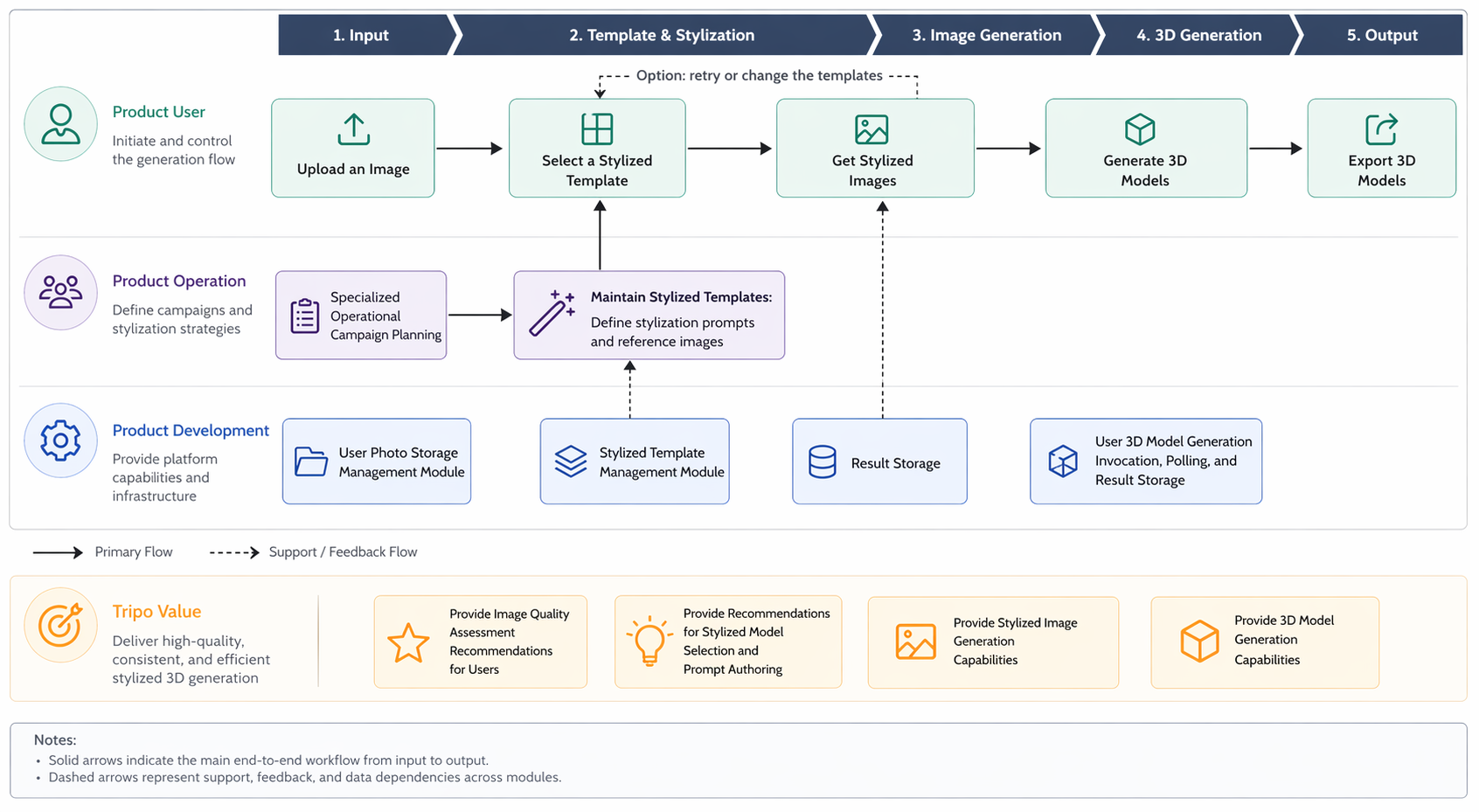
Recommended product design
You’re all set now. Please refer to the task type for detailed documentation.